
Manage your files on your Samsung device.
Screenshots:
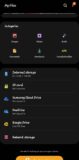
About Samsung My Files
Samsung My Files is the official file manager app. You can view and manage each of the files and folders on the internal or external memory of your device. That can be downloaded and used for free on Android devices.
The manager has a very simple interface. This simplicity turns out to be highly useful to help you find any element you’re looking for in seconds.
You can also manage files stored on SD cards, USB drives, and files in the cloud storage connected to your smartphone at the same time.
Samsung My Files:
Users can create folders move, copy, share, compress, and decompress files, and view file details. Folder and file shortcuts show on the device home screen and the My Files main screen.
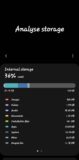
Types of files, including downloaded, document, image, audio, video, and installation files. The Recent Files list Files the user has downloaded, run and opened. Provides a function used to analyze and free up storage space. Try another app as well as Gallery Go.
You can hide any unused storage space from the main screen via the “Edit My Files Home”. You can view long file names without ellipses using the “Listview” button.
Samsung My Files app lets you save content straight to Samsung cloud drive. This is super important for freeing up space on your smartphone by taking advantage of those free 15GB offered to anyone who owns a Samsung device.
Technical file information
| Package name: | com.sec.android.app.myfiles |
| Version: | 15.6.01.22 (1560122000) |
| File size: | 56.2 MB |
| Updated: | |
| Minimum Android version: | Android 16 (API 36) |
| Screen DPI: | nodpi |
| Architecture: | arm64-v8a, armeabi-v7a |
| MD5: | 2b562ecc0a1e748462d4e713aeee8483 |
| SHA1: | b7807c657fa1f9b4a35b0fe472b669659b03cd36 |
Older Versions of Samsung My Files:
We’ve archived multiple Samsung My Files APK versions. Whether you’re downgrading or need a specific build, browse and download the older version that meets your needs. Download Samsung My Files Old Versions »
What's new in this version of Samsung My Files?
- When searching the internal storage, you can immediately add or delete Favorites while checking the folder route.
- When compressing files, you can strengthen the security by entering a password. Compressed files with passwords can also be unzipped.
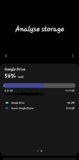
- “Analyze storage” now shows you how much storage is being used by file type on OneDrive/Google Drive.


